
IT Architecture
Becoming an ace of IT architecture documentation - Part I
Discover the purpose of the Technical Architecture Document (TAD) and how to structure it for your IT projects. Practical advice + a dedicated tool (Uncia).

Across my 10-year career in IT architecture, I have written more than a hundred architecture documents in different client contexts. I know how poorly perceived this documentation work can be and how it can become a real pain point for projects. Producing documentation is tedious, requires specific skills, demands regular updates, and so on. So I decided to start a series of articles to demystify this topic, with the aim of making it easier to grasp.
If I had to explain what a TAD (Technical Architecture Document) is to a non-initiated person, I would use the analogy of the blueprints used to build a building. Would you imagine building a house without blueprints?
By industry standards, building a house requires at least:
- A site plan to define the position of the house on the land
- A layout plan to show the access ways
- An elevation plan to describe the architecture
- A section plan detailing the interior
- A master plan describing the electrical setup
Why do we need plans? Simply because they act as reference materials:
- During construction, they help every trade involved deliver the expected result: a functional house where the bathroom is not in place of the kitchen and the front door is not on the second floor.
- Then, imagine you want to modify something in your structure later. You need to know exactly how it was built, so that any change can be made with control over the possible side effects. You wouldn’t want to dig somewhere a gas pipe is buried, for example.
Now think of the TAD as the blueprints of an application or an infrastructure service!
By architecture standards, the TAD is a set of documents that describes an application or an infrastructure service. There are 2 categories of information:
- Functional information, which describes how the application works and the service it delivers.
- Technical information, which describes the infrastructure foundation the application runs on.
In general, a TAD is composed as follows:
- An application diagram that forms the backbone of the TAD. This diagram synthesizes how the application works, showing: application modules, users, network zones, and application flows. It also shows interactions with other applications and infrastructure services in the IT system. The diagram is meant to be highly visual, to ease reading and let the reader grasp the structure and behavior of the application at a glance.
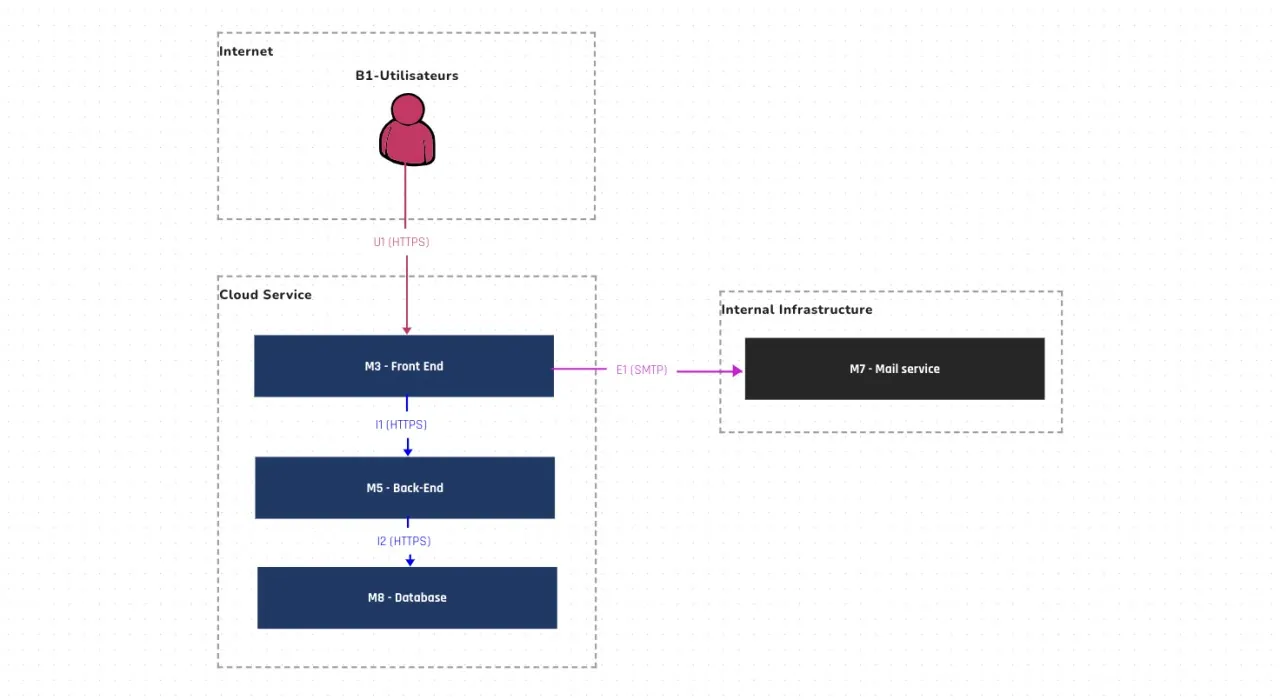
Below is an example of an application diagram for an application we’ll call Zebra:
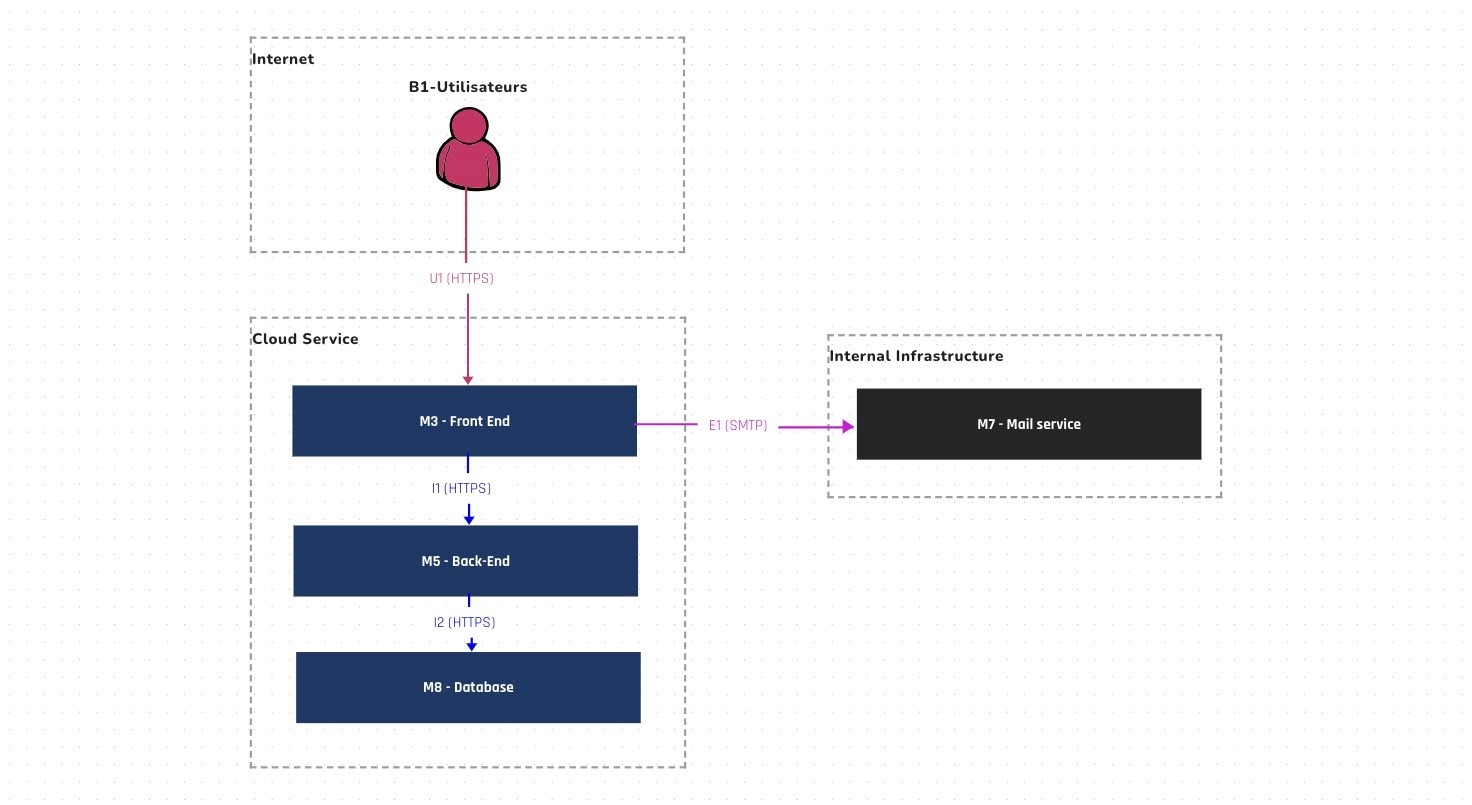
How do you read this diagram? Internet users connect to the Zebra application, located in the “Cloud Service” network zone, through its front-end. Zebra is composed of a front-end, a back-end, and a database. Zebra’s front-end uses a mail service located in the “Internal Infrastructure” network zone.
- A flow map that lists the flows shown on the application diagram and adds technical details such as ports, authentication method, confidentiality level, and so on.
- A hardware table that inventories all the infrastructure the application or service runs on. For each machine, it captures the technical characteristics (size, storage, backup, etc.) and the products installed (OS, software, etc.).
- A technical diagram that visually illustrates the hardware inventory by placing each machine in its data center and network zone.
- A synthesis document giving a general description of the application or service. It also captures the rationale for the technical decisions made over the application’s life cycle.
In my experience, applying this breakdown (or adapting it as needed) ensures that your documentation is structured and contains all the information levels useful to you, but also to other IT teams and even business stakeholders.
Don’t forget that the TAD, beyond being a technical document, is also a communication artifact!
In the next article, we’ll see how to ensure the quality of a TAD.
PS: We built the Uncia tool to provide a simple answer to all these pitfalls. Visit our page and reach out for more information!